
|
Book Use your pdf converter to make your pdf files easy! You can now buy software that makes converting pdf to doc possible! Did you know you can even convert pdf to word? Home Page Bloglines 1906 CelebrateStadium 2006 OfficeZealot Scobleizer TechRepublic AskWoody SpyJournal Computers Software Microsoft Windows Excel FrontPage PowerPoint Outlook Word 

Host your Web site with PureHost! 
|
 
Thursday, November 19, 2009 – Permalink – Control Access Text AlignmentDistribute Text Evenly Within ControlsWhen you add form or report controls, the Text Align property defaults to General setting: characters align to the left while numbers and dates align to the right. When you set up controls to act as headings or titles, you can achieve interesting visual results by changing the Text Align setting to Distribute (This is called Justify in Word). This setting distributes characters within the control evenly to span its entire width. If you apply this setting to a textbox control, the alignment switches to Left alignment when you click inside the control to allow for easy data entry.
See all Topics access Labels: Forms, Properties, Tips <Doug Klippert@ 3:31 AM
Comments:
Post a Comment
Monday, March 09, 2009 – Permalink – Change Properties in Form ViewAlterations on the runAs you work with a form, you will, sometimes, find controls would benefit from minor tweaking. You may want to change the color of a text box, change the font that's used, or remove scroll bars. You may have been told switch to Design view to make changes. However, you can display the property sheets for a control while you're in Form view. To do so, click the Properties on the View menu, Right-click, or press [Alt][Enter]. As in Design view, the displayed properties relate to the control that is selected on the form. The property changes you make are reflected on the fly. You will be prompted to resave your form when you close it. See all Topics access Labels: Forms, Properties <Doug Klippert@ 3:49 AM
Comments:
Post a Comment
Friday, November 07, 2008 – Permalink – Null, Nothing, NadaEmpty entries"An example might be fax numbers in a customer database. If you store a Null, it means you don't know whether the customer has a fax number.
Make Null Zero See all Topics access Labels: Customize, Forms, Properties, Tips <Doug Klippert@ 4:10 AM
Comments:
Post a Comment
Friday, October 10, 2008 – Permalink – Hidden PasswordsFormat to mask entryYou can easily set up a text box to mask entries with asterisks, allowing you to hide entries like passwords from prying eyes. To do so, in Design view, display the properties for the text box and change the Input Mask property to Password. Passwords can then be displayed as ****** Also see: Microsoft-AccessSolutions.co.uk: Add Simple Security How to create a User Login Form in Microsoft Access See all Topics access Labels: Forms, Properties, Queries, Tutorials <Doug Klippert@ 3:23 AM
Comments:
Post a Comment
Thursday, March 27, 2008 – Permalink – Entry CheckerA second chanceUnlike Word or Excel, Access does not warn you when data is changed. Unless you make a structural or code change, Access thinks you know what you want to know and allows you to enter or change data and the close the application without a squeak. There is a way around this: "In Microsoft Office Access 2007, by default, users are not prompted to confirm changes after modifying and saving records on a form. But often you might want to prompt users to confirm their changes before the record is saved. User Prompts (with a video) See all Topics access Labels: Macros, Properties, Tutorials <Doug Klippert@ 7:33 AM
Comments:
Post a Comment
Friday, August 10, 2007 – Permalink – Hardcopy RelationshipsDocument database
In Access 2000 thru 2003, this is easy. Simply display the Relationships window as usual and then choose File>Print Relationships from the menu bar. Doing so displays a report preview that you can then print or save.
Labels: General, Properties <Doug Klippert@ 6:32 AM
Comments:
Post a Comment
Tuesday, July 17, 2007 – Permalink – Flag Access ControlsTag PropertyThe TAG property allows you to associate up to 2,084 characters of text with any form, report, section, or control. This is especially helpful when you want to single out a specific subset of controls. For instance, say that you want to hide certain controls on a form when a user clicks a button. You can flag which controls will be hidden by entering the word "Hide" (or any other consistent word) in each control's Tag property. Then, attach the following code to the command button's Click event procedure: Dim ctl As Control 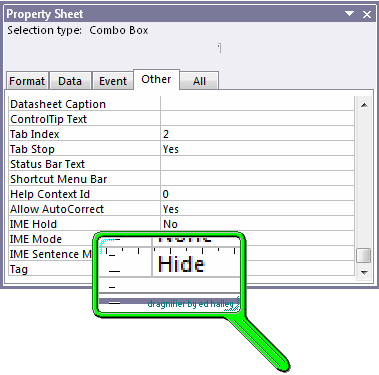 See all Topics access Labels: Macros, Properties, VBA <Doug Klippert@ 6:42 AM
Comments:
Post a Comment
Monday, April 16, 2007 – Permalink – Time IntervalRun code at timed intervals
Labels: Macros, Properties <Doug Klippert@ 6:10 AM
Comments:
Post a Comment
Monday, February 19, 2007 – Permalink – New Line in MemoLabels and Text boxesWhen you're using a form to enter text in a memo field, pressing [Enter] within the text inserts a line break. However, when you're working with a memo in a table's Datasheet view, pressing [Enter] moves the focus to the next field. You can force line breaks when you're entering text by pressing [Ctrl][Enter]. This technique also works with text fields and can be applied when you're entering text in labels or text boxes on a form. To permanently configure a text box so that pressing [Enter] inserts a new line, set its EnterKeyBehavior property equal to New Line In Field. See all Topics access Labels: Entries, Properties <Doug Klippert@ 6:10 AM
Comments:
Post a Comment
Saturday, February 03, 2007 – Permalink – Properties ReportRecord of RecordsIf you would like a report that includes all of the properties, relationships and permissions of the objects in your database, go to Tools>Analyze and choose Documenter... Access will create a VERY detailed report.  Ezy Documenter was recommended by Woody Leonard's Access Watch. See all Topics Labels: Properties <Doug Klippert@ 7:14 AM
Comments:
Post a Comment
|

