
|
Book Use your pdf converter to make your pdf files easy! You can now buy software that makes converting pdf to doc possible! Did you know you can even convert pdf to word? Home Page Bloglines 1906 CelebrateStadium 2006 OfficeZealot Scobleizer TechRepublic AskWoody SpyJournal Computers Software Microsoft Windows Excel FrontPage PowerPoint Outlook Word 

Host your Web site with PureHost! 
|
 
Thursday, January 07, 2010 – Permalink – Automate ShutdownClose everythingIt's generally considered good form to close all forms and reports when you're shutting down a database.Here's a link to some code that takes care of it for you. TechRepublic.com See all Topics access <Doug Klippert@ 3:01 AM
Comments:
Post a Comment
Thursday, December 24, 2009 – Permalink – List Fields in Access TablesBit o' codeWhen viewing a table that has many fields in Design view, you have to scroll up and down to review the field names. This can be tiresome when you're referring to them constantly, and particularly when you're working with several tables. The following code produces a field listing for a given table. This can then be copied to Notepad and printed for easy reference. Enter the code into a module, substituting your table's name where appropriate. Open the Debug/Immediate window, type ListFields, Press Enter to produce the listing. Sub ListFields() Dim dbs As DATABASE Dim dbfield As Field Dim tdf As TableDef Set dbs = CurrentDb Set tdf = dbs.TableDefs!NAMEOFYOURTABLE Debug.Print "" Debug.Print "Name of table: "; tdf.Name Debug.Print "" For Each dbfield In tdf.Fields Debug.Print dbfield.Name Next dbfield End Sub See all Topics access <Doug Klippert@ 3:33 AM
Comments:
Post a Comment
Thursday, November 05, 2009 – Permalink – Change Code to CommentsFast solutionWhen you're testing procedures, you can temporarily convert a block of VBA code to comments that will be ignored during a trial run. Doing so manually by inserting an apostrophe before each line of code can be a real chore. To simplify this task,
See all Topics access Labels: VBA <Doug Klippert@ 3:42 AM
Comments:
Post a Comment
Saturday, September 12, 2009 – Permalink – Declaring Multiple VariablesDeclare each oneWhen setting up a macro in VBA, if you want to declare multiple variables in one line of code, be sure to specify the type for each variable, even if the variables are the same type. Avoid code like the following: Dim strFName, strLName, strMI As String In such a case, only the last variable, strMI, is actually declared as a String type. The first two variables are designated by default as Variant data types. To correctly declare the three variables, you would use the statement: Dim strFName As String, strLName As String, strMI As StringSee all Topics access Labels: VBA <Doug Klippert@ 3:54 AM
Comments:
Post a Comment
Wednesday, June 17, 2009 – Permalink – VBA Variable ProblemsExplicit protectionIt's good practice to always use the Option Explicit statement in the beginning of your code modules to ensure that all variables are unambiguously declared in your procedures. With this process in place, you'll receive a "Variable not defined" error if you try to execute code containing undeclared variables. Without this statement, it's possible to mistype variable names, which would be interpreted as new Variant type variables. This could severely impact the results of your code, and you might not ever know it. If you do find a problem, tracking down where the error is can be a chore. Although you can manually type the statement into your modules, changing a setting in Access can ensure that the statement is always added to new modules.
 See all Topics access Labels: VBA <Doug Klippert@ 3:37 AM
Comments:
Post a Comment
Thursday, January 29, 2009 – Permalink – Sort FormsCreate a sorting functionHere is one way to provide your users with a means to reorder fields in forms."Chris Weber develops a solution that allows users to sort the data in their forms (or subforms) that you can add to your application easily.Let Your Users Sort it Out  Scroll down to the bottom of the page. There is a file that can be downloaded with the code. See all Topics access <Doug Klippert@ 3:04 AM
Comments:
Post a Comment
Tuesday, December 02, 2008 – Permalink – Text Box HighlightsChange backgroundIt can be difficult to tell which text box on a form you're currently working with. One solution is to highlight the current position, with a different background. Access 2000+ allows you to do this with conditional formatting, but you can also get a similar result using code. To do so, create a new Module and add the following code: Save and close the Module, then open the appropriate Form in Design view. Click the Code button and insert =Highlight("GotFocus") in each of the Form's textbox control's GotFocus event procedure. Likewise, add =Highlight("LostFocus)") to each textbox's LostFocus event procedure. <Doug Klippert@ 6:55 AM
Comments:
Post a Comment
Friday, July 18, 2008 – Permalink – Signing MacrosSecurity levelsThere are three levels of Macro security:
"If you've used Access 2003, you've probably seen several security warning messages - Access 2003 cares about your security. An important part of Access 2003 security is digitally signing your code. As Rick Dobson shows, you can do it, but preparing for digital signing is critical. Also: Other links: <Doug Klippert@ 5:01 AM
Comments:
Post a Comment
Sunday, April 13, 2008 – Permalink – Canada/US Postal CodesAutomatic Input masksIf you have a mix of Canadian and US postal codes, you might play with the following code inserted as a Country control "After Update" Event property.
See: Trinity University - San Antonio, Texas: <Doug Klippert@ 5:57 AM
Comments:
Post a Comment
Sunday, March 23, 2008 – Permalink – Reminder - Task - E-mailSent from AccessA great web site for Office information is Woody Leonard's WOPR.com. There are a couple of newsletters associated with the site including: Woody's ACCESS Watch
"If you have a table that contains a date field, and you want to make sure that something happens on that date, one way is to create an Outlook task with a reminder that will pop up on the specified date; you can even use the Outlook reminder to create an email message that will be sent on the specified date.
Helen Feddema has been working with Word since v. 1.1, Access since the beta of v. 1.0, and Outlook since the beta of v. 8.0 (that's where Outlook started its version numbering). See all Topics access <Doug Klippert@ 6:51 AM
Comments:
Post a Comment
Thursday, February 21, 2008 – Permalink – VBA, Named ArgumentsAn easier read
MsgBox(prompt[, buttons] [, title] [, helpfile, context]) When you work the MsgBox function this way, the order of the arguments can't be changed. Therefore, if you want to skip an optional argument that's between two arguments you're defining, you need to include a blank argument, such as: MsgBox "Hello World!", , "My Message Box" Named arguments allow you to create more descriptive code and define arguments in any order you wish. To use named arguments, simply type the argument name, followed by :=, and then the argument value. For instance, the previous statement can be rewritten as: MsgBox Title:="My Message Box", _ (To find out a function's named arguments, select the function in your code and press [F1].) See all Topics access Labels: VBA <Doug Klippert@ 8:00 AM
Comments:
Post a Comment
Saturday, January 19, 2008 – Permalink – Convert Access Macros to VBAMacros to Modules
In 2007 go to Database Tools and look in the Macros group. <Doug Klippert@ 7:05 AM
Comments:
Post a Comment
Sunday, December 16, 2007 – Permalink – Office VBA TricksVideo + Free codeQuick tips VBA Video "Learn tips and use sample code for several Office applications. These tips can help you to be more productive and can also be a starting point for developing your own tools, utilities and techniques."
Ten Tips for Office VBA Developers See all Topics access Labels: VBA <Doug Klippert@ 5:06 AM
Comments:
Post a Comment
Saturday, November 03, 2007 – Permalink – Automation - VBA - Help FileOffice Wide
See all Topics access Labels: VBA <Doug Klippert@ 6:54 AM
Comments:
Post a Comment
Friday, August 17, 2007 – Permalink – Insert Line Breaks Through CodeLabel Captions
To successfully insert a line break in a label caption, you need to include both a line feed character and a carriage return character, entered consecutively.
Me.Label1.Caption = "Line 1" & _ However, you can also simplify your code using an built-in constant: Me.Label1.Caption = "Line 1" & vbCrLf & "Line 2" See all Topics access Labels: VBA <Doug Klippert@ 7:26 AM
Comments:
Post a Comment
Tuesday, July 17, 2007 – Permalink – Flag Access ControlsTag PropertyThe TAG property allows you to associate up to 2,084 characters of text with any form, report, section, or control. This is especially helpful when you want to single out a specific subset of controls. For instance, say that you want to hide certain controls on a form when a user clicks a button. You can flag which controls will be hidden by entering the word "Hide" (or any other consistent word) in each control's Tag property. Then, attach the following code to the command button's Click event procedure: Dim ctl As Control 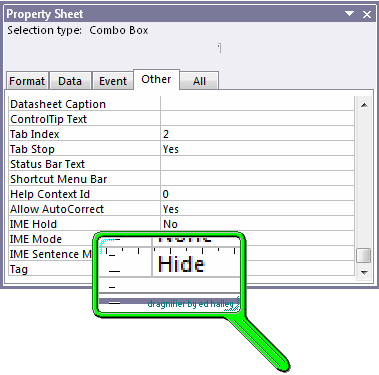 See all Topics access Labels: Macros, Properties, VBA <Doug Klippert@ 6:42 AM
Comments:
Post a Comment
Tuesday, June 19, 2007 – Permalink – Indent CodeRealign a bunchIndenting blocks of VBA code, such as statements within loops or If...Then statements, makes reading a procedure much easier. You probably indent a code statement using the [Tab] key, and outdent by using [Shift][Tab]. However, you may not be aware that the [Tab] and [Shift][Tab] techniques also work when multiple code lines are selected. The Visual Basic Editor also provides Indent and Outdent buttons on the Edit toolbar that allow you to easily reposition blocks of code. See all Topics access Labels: VBA <Doug Klippert@ 6:31 AM
Comments:
Post a Comment
Monday, June 11, 2007 – Permalink – Access Field HighlightingMore codeThis technique can also be applied to controls like option groups. Instead of using OnGotFocus and OnLostFocus events you must use the OnEnter and OnExit events. In addition, the control group's BackStyle property must be set to Normal to take advantage of the Windows color scheme: Function Highlight(Stat As String) As Integer Take advantage of global constants. Just add the following two statements to a module: Global Const Orange = 39423 Global Const LightBlue = 16776960 Then, set the OnGotFocus and OnLostFocus events for the controls in the following format: Private Sub controlName_GotFocus() See all Topics access Labels: VBA <Doug Klippert@ 6:14 AM
Comments:
Post a Comment
Monday, April 23, 2007 – Permalink – Numbers to WordsCardinal numbersYou can create a User Defined Function in Access to covert numbers to words. The function can be used in a calculated field or control in a form or report. From the Microsoft Knowledgebase collection: How to Convert a Numeric Value into English Words - 210586  Also: The Access Web (MVPS) Convert Currency ($500) into words (Five Hundred Dollars) TECH on the Net.com Convert currency into words (The Access code also works in Excel) To create Cardinal numbers in Excel see: Excel - Numbers to Words (The Excel code also works in Access) Word appears to be the only Office app with a built in cardinal number function. For Word see: Word - Numbers to Words See all Topics access <Doug Klippert@ 5:15 AM
Comments:
Post a Comment
Saturday, March 31, 2007 – Permalink – Comment CodeEdit toolbar
<Doug Klippert@ 7:05 AM
Comments:
Post a Comment
|


